

 8 hours ago
2
8 hours ago
2
PROTECT YOURSELF with Orgo-Life® QUANTUM TECHNOLOGY
Orgo-Life the new way to the future Advertising by Adpathway
As a longtime user of the original, Neil was excited to see what the new COROS DURA 2 SOLAR had in store. His review dives into his impressions of the new head unit, how it differs from the much-beloved debut model, and whether the price jump is worth it for those considering the upgrade. Find his full video and written reviews below…
Additional photos by Logan Watts
Today, we’re looking at a new head unit, the COROS DURA 2 SOLAR. It looks unlike any I’ve ever seen. In my latest review, I’ll be diving into the details you need to know, including the specs, some interesting new features, a few major head-scratchers, and my first impressions. Check out my full video review followed by a written version below.
The First DURA Was Legendary
The original DURA was, and still is, an amazing head unit. It has the best battery life of any head unit I’ve ever used, a simple interface in a sea of increasingly complicated options, and, best of all, a very affordable $250 price tag. COROS made a splash in the cycling world, and the DURA became one of the best head units for bikepacking. In fact, I’ll say it: for trips longer than three days, it’s my first choice because of its battery life. Before the first DURA release, COROS wasn’t exactly a household name in cycling. Despite its success, it still might not be a household name. But it gained plenty of recognition for delivering a head unit that lasts a ridiculously long time without breaking the bank, giving it a solid foothold in a saturated industry.
The first Dura is pictured on the right.
That said, COROS released the first DURA before it was truly ready. Maybe that’s why the price tag was so enticing. Did it get the job done? Yes. But as I mentioned in my *original review*, there were some hiccups. I held off on reviewing it until a few firmware updates had addressed enough of those issues. Doing a first look at the DURA 2 SOLAR hurts a little, because I know I haven’t put it through the kind of testing I normally would for a full review. But most of those early growing pains seem to be behind us. And during my initial testing, the DURA 2 has felt much more refined and ready for market. And yes, it’s pretty darn weird-looking.
| Weight | 101g | 100g |
| Battery Life (all systems on) | 120 hours | 120 hours |
| Price | $250 | $549 |
| Size (mm) | 99.5 x 60.8 x 15.7 | 117 x 58 x 17 |
| Screen | 400 x 240 pixel MIP Display | 336 x 620 Sharp MIP Display |
Unboxing
The unit comes in a nice box. Open it up, and you’ll find the DURA 2 SOLAR with stickers identifying the dials and buttons. It also comes with a lanyard to wrap around the bars or stem for security, which I always use with head units. I appreciate that COROS still includes what looks like a quality, long USB-C to USB-C cable and a bunch of instructions. Oddly enough, my test unit didn’t come with a mount. Logan got the new aluminum one, and he said it’s well-made and sleek, and it comes with a GoPro-style undermount option for lights or a camera.
Since plenty of customers already have mounts, you can buy the unit on its own or pay extra for a version with a mount. I asked COROS to send me one, but it didn’t arrive in time. Packaging isn’t a major factor in the overall experience of any piece of tech, but it’s well done here: clean, nearly all recyclable, and thoughtfully put together. Many cycling head unit companies have dialed that in over the last few years, and I appreciate it.
DURA 2 Goes Premium
The DURA 2 SOLAR is a big departure from the original unit. The original unit positioned itself as a budget option amid increasingly expensive computers. I don’t know if this was the plan all along, but bringing an affordable head unit into a market with so few budget options made a lot of sense. Add the incredible battery life, and the original DURA was a unicorn. But breaking into the cycling industry as a relatively unknown brand isn’t easy. COROS mentioned that DURA sales were a little slow at first, but picked up as more people learned about the price and user feedback and reviews started rolling in.

Instead of updating the DURA and maintaining that price point, COROS decided to go premium. I’ll admit it’s a little disappointing, especially since they’re discontinuing the original. I’m sad to see that option go, and it feels like a massive miss. Let’s hope they bring a lower-budget option to the table, but I’m not holding my breath. If anything, I think they might drop “SOLAR” from the product name and launch a non-solar unit at a slightly lower price, but that would eliminate one of the new unit’s best features.
I’ve always thought of COROS as a brand for the people. I’ve used their watches for three years now, and between the features, battery life, and price, they’re pretty hard to beat. It gave me the impression that a brand could build good products, deliver a strong user experience, and still make a profit without charging top dollar. That said, the DURA 2 SOLAR comes in at $499 without a mount or $549 with one. That puts the unit alone at roughly twice the price of the first DURA, which launched just two years ago. Inflation aside, that’s a pretty big jump. So, let’s dive into the differences and see whether the new one is worth it.
COROS Dura 2 SOLAR Specs
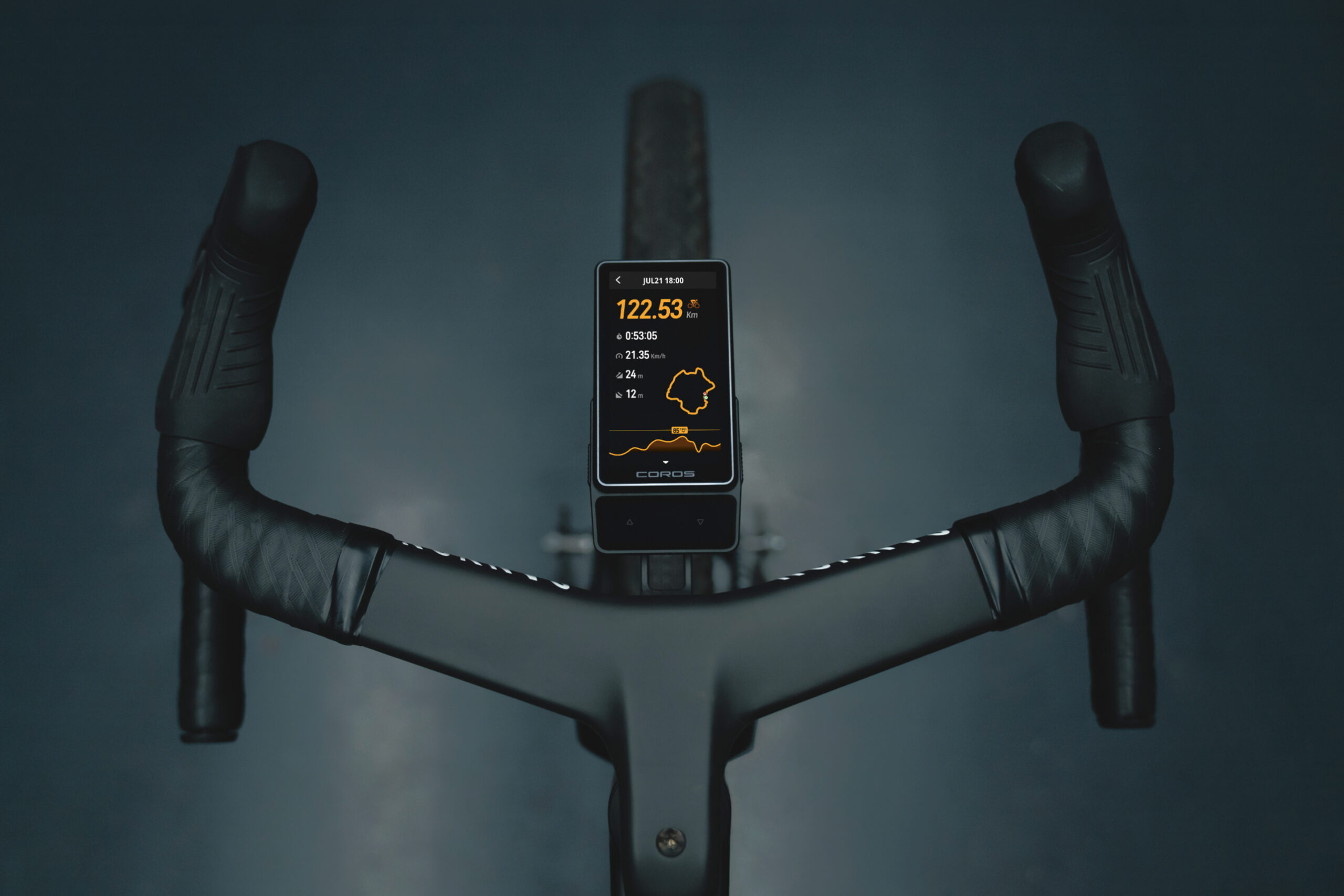
The new DURA 2 SOLAR is a looker. It uses a carbon-and-alloy construction, compared to the first DURA’s mostly plastic body, and they weigh about the same: 100 grams for the DURA 2 SOLAR and 101 grams for the other. The overall shape is strange. It almost looks like a concept car, and COROS seems to be leaning into aerodynamics. The upper portion is only 5.7mm thick, easily the thinnest of any head unit I’ve tested. It thickens toward the main body near the quarter-turn mount. It’s similar in width to the original but significantly longer, measuring 117mm long, 58mm wide, and 17mm thick. Overall, it feels nice in the hand and is fairly lightweight. Once you attach it to the quarter-turn mount, it sits nicely out front. From the top, it doesn’t look nearly as ridiculous as it does from the side.
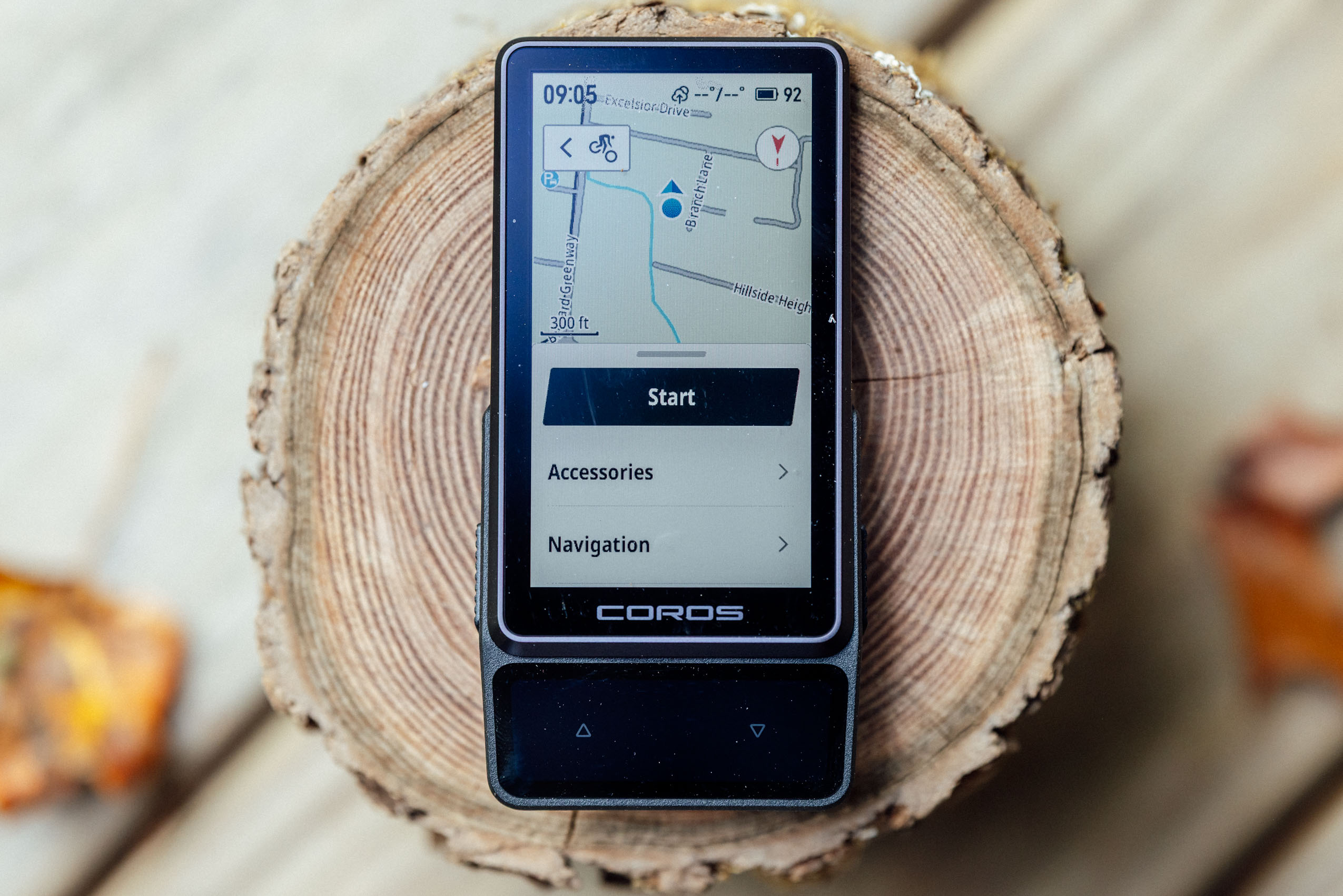
The controls have changed too. It has two physical buttons, one on each side, but the oversized watch-style scroll dial is gone, which I really enjoyed using. Now you get two haptic buttons at the bottom, plus an updated touchscreen that feels much more sensitive and responsive than the original. You can also charge the device using the USB-C port below the right button. The larger 3.5” display is a welcome change. This was one of my complaints with the original, especially when navigating: it seemed like they could have fit a larger screen into the body. I think they’ve done a good job addressing that here. In my initial testing, the touchscreen works well, and I like the haptic feedback. And paired with the side buttons, it’s intuitive and relatively simple to use.
Hardware
Speaking of the screen, the DURA 2 SOLAR still uses a sunlight-readable, Memory-in-Pixel, or MIP, display designed for low power consumption. However, the DURA 2 offers a much better 17:9 aspect ratio, 201 pixels per inch, and a 38Hz refresh rate. Alternatives offer richer colors and smoother motion, but MIP prioritizes battery life and readability in direct sunlight; for example, the Hammerhead Karoo 3 features a 3.2-inch AMOLED touchscreen. It looks stunning, but its battery life is really poor overall.
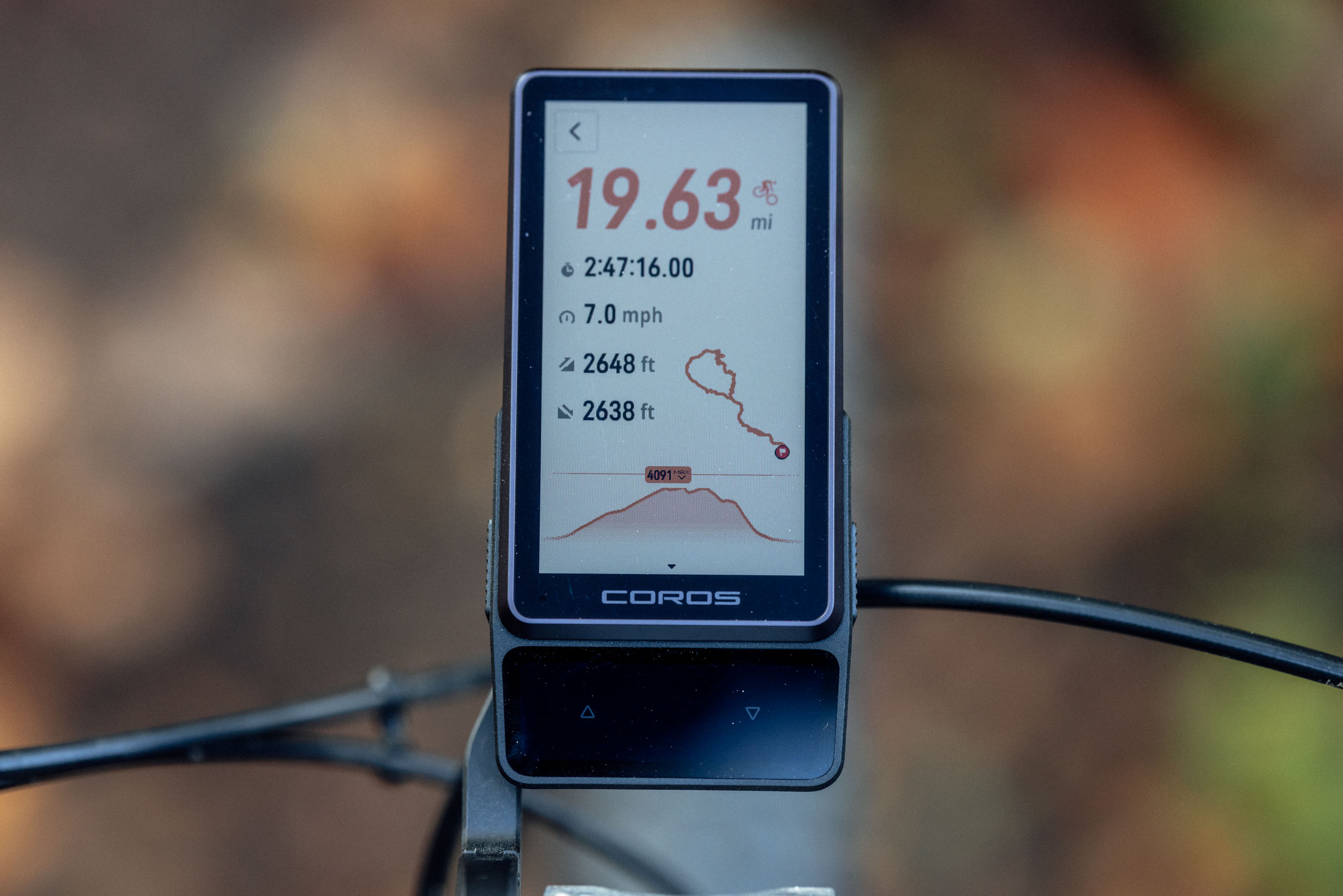
Overall, it’s a big upgrade over the previous screen. Small details like trail and road names are easy to read, and the unit feels faster. You also get 32GB of internal storage, which COROS says accommodates around 1,200 hours of activity recording. That’s plenty of room for rides, but keep in mind that downloaded maps take up storage, too.
Solar and Battery
One big change is the solar panel’s location. On the original DURA, it sat above the screen. On the DURA 2 SOLAR, it sits below the screen and shares that space with the haptic buttons. COROS says this improves the appearance while giving that area two functions. The unit still uses a dedicated solar panel rather than integrating solar collection into the screen like Garmin units, an approach it says charges the unit more effectively.
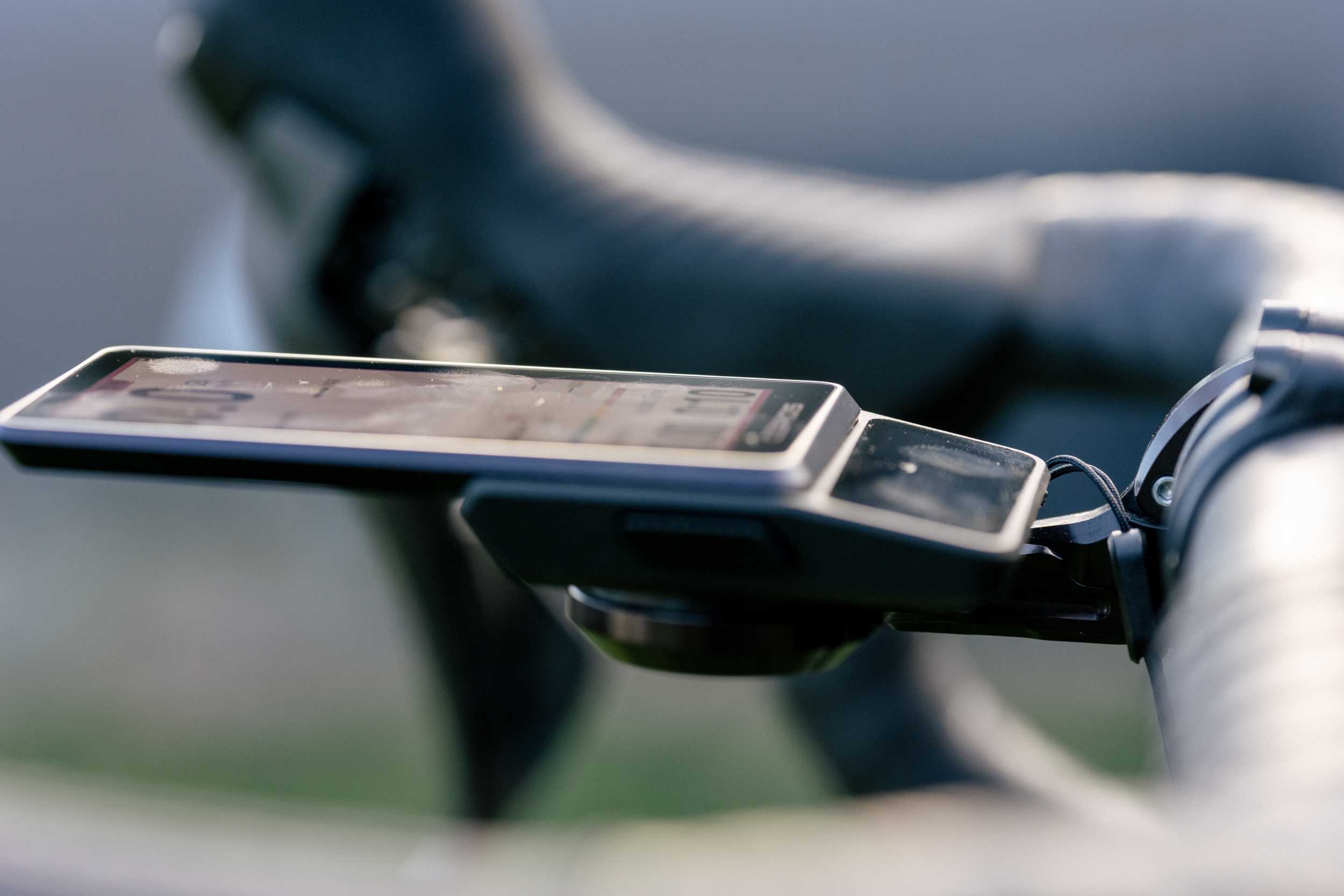
My biggest concern is that the panel now sits closer to the rider and lower than the screen, which could leave it more shaded. It also angles slightly toward you, whereas the original panel faced more directly upward and sat farther away from the rider. I actually noticed this on a ride where the sun would have hit the first DURA’s panel fully but was slightly shaded because of the design.
That said, COROS says the panel is 17% larger and 25% more efficient, giving this unit the same battery life as the DURA. It claims 120 hours of battery life, with solar charging adding up to two hours of battery gain for every hour of ride time. That solar claim is measured at 75,000 lux, so we’re talking some pretty strong solar rays. If you ride in heavy cloud cover, don’t expect anywhere near that same gain. On paper, those battery and solar claims match the original. Again, I’ll need long-term testing to see how it holds up, especially with the panel’s new position. My unit arrived with around 96% battery, and I haven’t charged it yet. After a week of riding in Colorado in October, it’s only down to 72%. That includes plenty of indoor tinkering and messing around while putting this video together.
Comparison to other GPS Units
Battery life reflects manufacturers’ claims under varying conditions. Prices are US launch prices…
| COROS DURA 2 Solar | 120 hrs + solar | $499 |
| COROS DURA (Original) | 120 hrs + solar | $249 |
| Garmin Edge 1040 Solar | 45 hrs + solar | $750 |
| Garmin Edge 840 Solar | 32 hrs + solar | $550 |
| Garmin Edge 840 | 26 hrs | $450 |
| Wahoo ELEMNT ROAM 3 | 25 hrs | $465 |
| Hammerhead Karoo 3 | 15 hrs | $475 |
Activity Settings
One of the best things about the main page is that it’s simple, customizable, and just easy to read. When the unit is dark, you can press either side button to launch the active screen. Before a ride, you can see the time, solar input, temperature, and battery level at the top. Below that are your ride types. You can customize the order in the app, so I put mountain biking first, followed by gravel, but I can’t seem to remove the others. I wish I could get rid of the ones I don’t use.
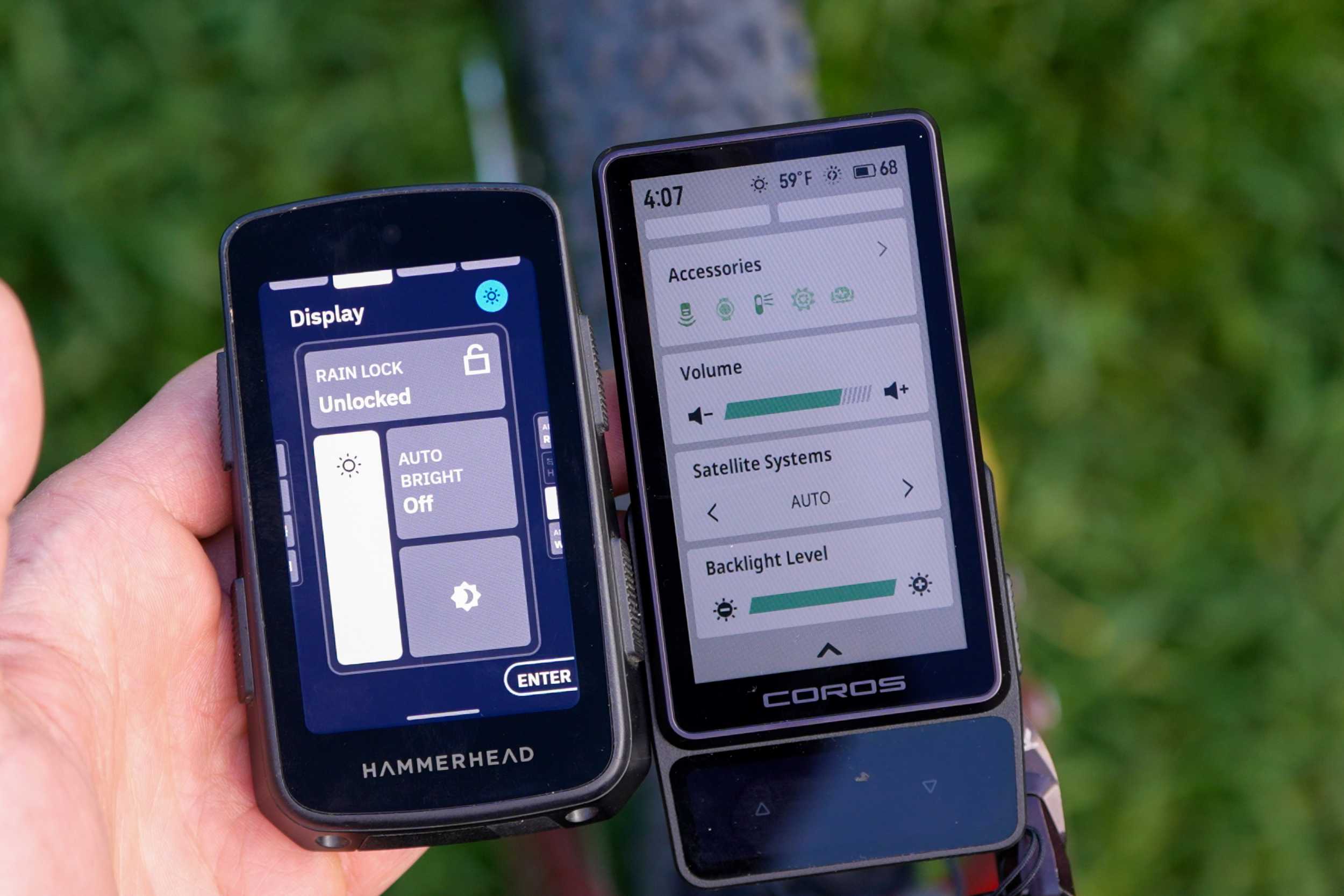
Below the activities, you’ll find navigation, where you can select a route and structured workouts. You’ll also find a training calendar, activity history, battery usage, and another way to access system settings. You can also do these things in the app, but being able to do them on the unit alone is really nice. To start your ride, select an activity to go to the Start Activity page, where you can see which accessories are connected, navigate a route, and set activity alerts.
You can customize the data pages and layouts for each activity in the app, and it’s easy to make them as simple or as detailed as you want. For testing, I stuck with the default setup, but once I’m done, I’ll probably delete everything except the map and climbing pages. Once you press start, those pages will appear, and you can swipe up or down to move through them. To end your ride, press the right-side button and select Finish. You can also access settings and navigation from that menu. Or simply end your ride.
Maps and Navigation
Navigation is obviously one of the main reasons you’d want to use this device. Honestly, it’s the primary reason I use a head unit at all these days. If I just want to track a ride, watches have come so far that they do a fantastic job. Even when I’m bikepacking, I can get away with using the COROS APEX 4 for basic navigation. It works just fine, but that’s a topic for another day.
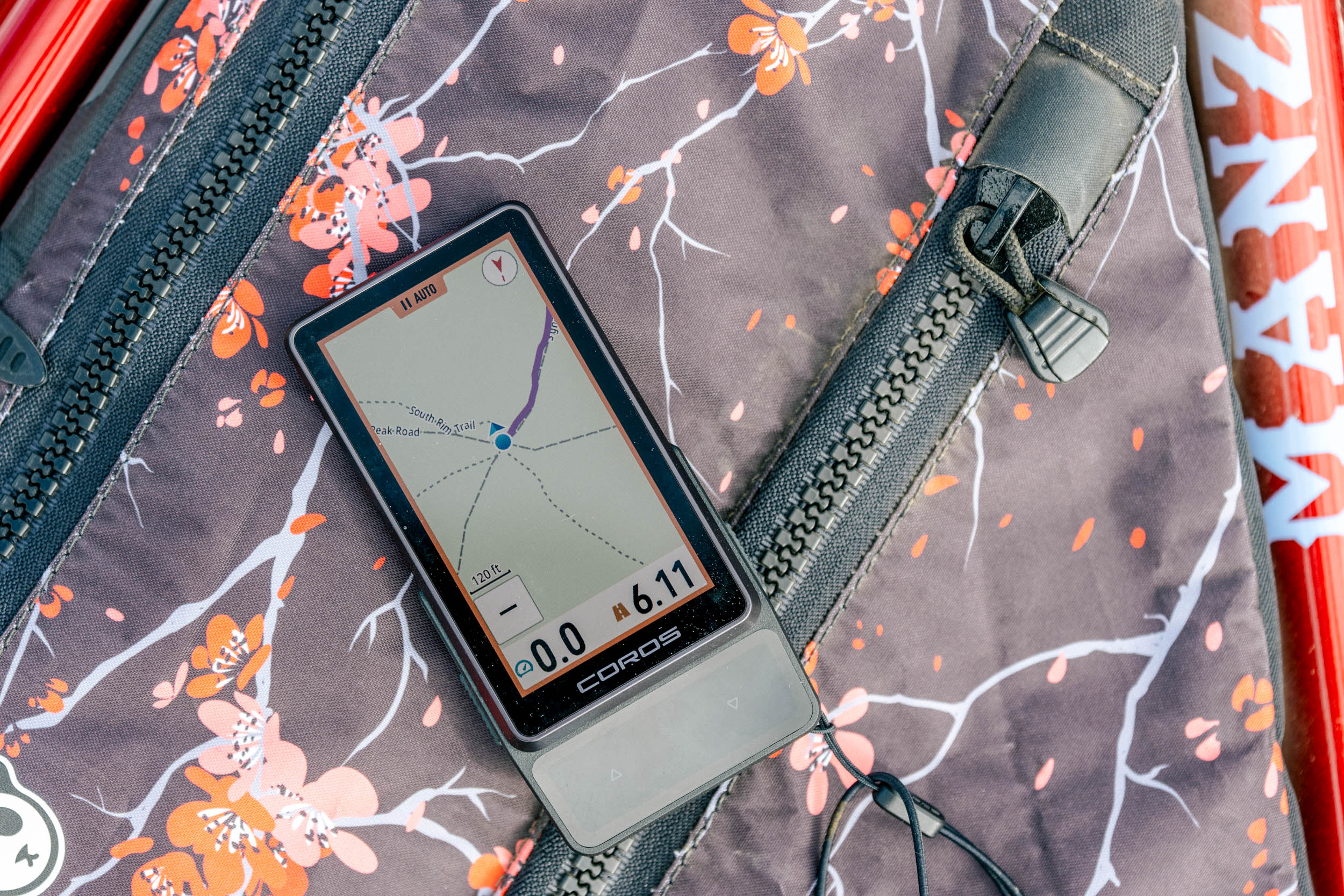
A lot of what makes the DURA 2 SOLAR feel more polished is its faster processing. It’s quicker and less clunky than the original. The DURA 1 never really felt like a smartphone, but the DURA 2’s map interaction gets much closer to that experience. It’s simple and intuitive. It’s fast enough to pinch-to-zoom, use your finger to move around the map, or use the plus and minus buttons at the bottom. The compass button in the top right lets you switch between keeping north at the top and keeping your direction of travel at the top. I’m a fan of direction-of-travel, but either way, it’s nice to have that control readily available. Map orientation was one of my frustrations in the early days of the original DURA, so I appreciate how easy it is to toggle the two modes here.
The maps also look more detailed, and paired with the improved resolution, they’re easy on the eyes. Road and trail names are easier to find too, which is a welcome change from the first model, where some trails weren’t even labeled, at least early on. And to my surprise, after poking around in the map settings, I found Hybrid mode, which combines topographic detail with the landscape map. The topo layer on its own is pretty horrible, but Hybrid is good. Just make sure you download the maps for your riding area to see all that detail, and download maps to your phone, too, if you want offline rerouting.
That offline map download matters because, if you go off course and want a reroute, the system can use your phone’s offline maps to calculate one. If you have cell service, it can use that connection instead. Personally, I don’t rely on automatic rerouting in any head unit, so it’s nice that you can dismiss the rerouting prompt, which I did during my first few rides. Now, following a route is pretty straightforward. You get directional arrows and a dark blue line showing your route, with a pink breadcrumb showing where you’ve ridden, and prompts for the next turn appear at the top of the screen.
It also has a climbing feature that shows what’s ahead. I used to hate these, but I’ve come around. Sometimes it’s just nice to know what you’re getting into. The climbing page is one swipe up from the map in default activity settings, so it’s easy to move back and forth between the two. This is how you actually swipe through all cycling pages, up and down. The climbing functionality works with uploaded routes and during rides without a route loaded, as long as you’ve downloaded the maps for the area you’re riding in. You also get plenty of the features you’d expect from a modern head unit: navigation back to your start, live tracking, options for turn-by-turn notifications, and the ability to add and view custom waypoints. It also has weather alerts, though I haven’t received one yet, so I’m curious to see how they work in practice.

Getting routes onto the unit is also pretty straightforward and the same as the prior model. I use Ride with GPS almost exclusively, and once I linked my accounts, routes synced automatically to my COROS route collection. I also often export a GPX file from the Ride with GPS app and open it in the COROS app. And if you prefer, you can also build a route directly in the COROS app. So, if you’re bikepacking, the DURA 2 will certainly get the job done. The screen is easy to read in bright sunlight and in the shade. If you need a brighter backlight, you can adjust the brightness in the Control Center by swiping down from the top of the screen.
Control Center
The Control Center and Settings let you quickly access settings by swiping down from the top of the screen. One pretty cool feature in the top left is the bike alarm. Say you’re running into a convenience store and didn’t bring a lock. Once activated, the unit will sound an alarm if it detects the bike moving, and it can also send an alert to your phone. However, you do need to stay within Bluetooth range to receive that phone alert. The idea is that the device’s alarm will scare any perpetrator away.
In the top right, you’ll find the system settings, where you can pair your phone, connect to Wi-Fi, add accessories, and dig into some deeper settings. A few are worth checking right away. For the sake of your riding buddies, go into the sound settings and turn off operation sounds. Otherwise, every button press makes noise, and it gets annoying fast. You can also adjust the haptic feedback and change your map layers here, among other things.
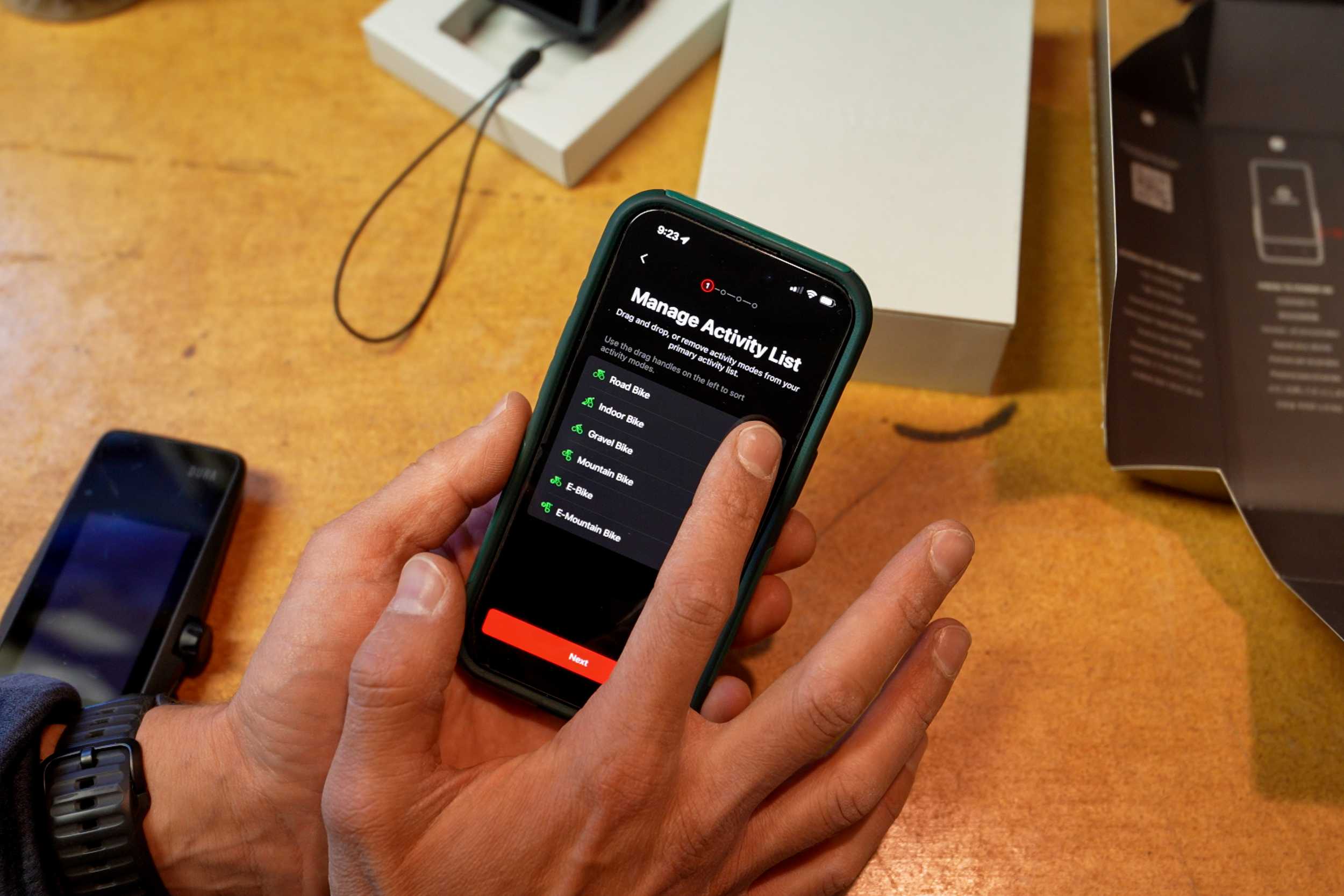
Back in the main control center, you can manage accessories like heart rate monitors, radar lights, and electronic drivetrains. I’m not a huge fan of having accessory settings in so many places; this is certainly the easiest place to access and add them. This is where you add things like HR monitors, electronic drivetrains, and even an Insta360 camera, for example, which you can control from the unit itself, which is pretty neat. To my surprise, all my past pairings showed up in the app, which is pretty cool.
You can also adjust the volume, change satellite settings, view phone notifications, and check battery usage. I keep the satellite setting on Auto, which suits my rides around home with limited trees, but I wouldn’t mind a more endurance-focused GPS setting for even better battery life. The battery usage screen is fun to poke around in, especially to get a sense of your usage patterns. Mine is a little skewed right now because I’ve spent so much time using the device indoors while writing this review, but it’s still fun to geek out on the stats.
Other Features
Training
If you’re into training, this device certainly won’t hold you back. For structured workouts, you get plenty of metrics and screen options, plus custom data fields for heart rate, power, cadence, and more. I use a COROS watch, so I can pair it with the DURA to display my wrist-based heart rate. That’s not always the most accurate measurement, but it gives me a sense of it. If I were still training, the DURA would win me over due to its simplicity.
Voice Functionality
Another new feature is voice interaction, which lets you talk to the unit to perform certain actions. This came over from the watches, though I’ve never used it. But it’s a nice option to have. It’s not nearly as comprehensive as your phone, but you can do things like start or end a ride and open navigation. The idea is to spend less time fiddling with buttons, which I appreciate.
That said, my first few attempts didn’t quite produce what I wanted. That might be because I’m using beta software, but it still feels unfinished. COROS seems to be putting a lot of energy into this, and I like the potential. I use dictation on my phone all the time, and when it works well, it really does speed things up.
Bell
Like the newer Wahoo head units, the DURA 2 SOLAR now has a bell, which you activate by double-tapping anywhere on the screen. It’s a handy addition, but I still prefer the sound of my Spurcycle bell.
Media Controls
The media controls are another nice feature. During an activity, you can swipe sideways to access pages like the media player and other controls, such as the camera. I found it really easy to skip a song I didn’t want to hear without digging out my phone.
Application Use
I know this goes beyond what some people need, but one reason I enjoy using COROS watches is how the app brings everything together. Between daily wear, activities recorded on the watch, and rides on the DURA, you get a pretty interesting picture of your activity and recovery.
I don’t take those numbers too seriously, but I do enjoy tracking overnight HRV, recovery estimates, stress levels, resting heart rate, and weekly training load. Some of those metrics come from wearing the watch, but having everything in one place is nice. And there’s no additional subscription to access them.
- Model Tested: COROS DURA 2 SOLAR
- Actual Weight: 100 grams (3.53 ounces)
- Place of Manufacture: China
- Price: $499
- Manufacturer’s Details: COROS
Pros
- Excellent battery potential, with a claimed 120-hour runtime plus solar charging
- Larger, sharper screen that’s easy to read in most conditions
- Faster processing and a much more responsive touchscreen
- Improved map detail, with a useful Hybrid topographic view
- Simple interface with easily customizable data pages
- Cost is in line with the competition
- Dura Original will get a few of the Dura 2 firmware updates
Cons
- Roughly twice the cost of the original, plus an extra cost for the mount
- New solar panel placement may leave it more shaded by the rider
- Voice controls remain unreliable during initial testing
- Not the biggest fan of the overall look
- The original scroll dial is gone
Wrap Up
As I mentioned at the start, the original DURA was a little rough around the edges at launch, but the core idea was clear: simplicity and incredible battery life. The DURA 2 SOLAR follows that same approach.
After a week of use, it feels much more ready to go than the original did at launch. But I also expect COROS to keep refining things through software updates. There are still some quirks, like the bell volume being separate from the unit’s overall volume, and the voice features, which aren’t working particularly well for me right now. Are there upgrades? Absolutely. Better maps, faster processing, and a larger, clearer screen make this unit more enjoyable to use. The more time I spend with it, the more I like it. But after a week, I haven’t seen anything that would make me tell a happy first-gen owner to rush out and upgrade. And I still need more time to see how the new solar panel placement performs in actual riding.
My biggest disappointment is losing the affordable option. The first DURA offered something pretty unique: simple navigation and incredible battery life for $250. I can appreciate COROS building a more premium unit, but I wish it could have done that while keeping an affordable DURA in the lineup. If you already own the original and it’s doing everything you need, there’s a lot to be said for sticking with it. If you’ve wanted a larger screen, better maps, and a more responsive experience, the DURA 2 delivers meaningful improvements. The bigger question is whether that’s worth $499 without a mount. For me, it’s a promising first impression, but the long-term testing starts now.
Logan’s Two Cents:
After spending some time with the new COROS DURA 2, I’m pretty impressed. Like Neil, my biggest disappointment is that COROS abandoned the affordability that made the original DURA so appealing, but I still like a lot about this second-generation unit. The touchscreen is incredibly responsive, the haptic feedback feels great, and the interface is fast, intuitive, and polished. The screen is crisp and easy to read for my aging eyes, and little touches like the animated ride summary add to the experience. I also appreciate being able to prioritize my preferred ride type (mountain biking, of course), and the unusual form factor isn’t nearly as awkward in person as it looks in photos. My one concern is the relocated solar panel, which seems more susceptible to being shaded by the rider. These are very early impressions based on extremely limited use, but aside from the significant price jump, I’m impressed with what COROS has done here.
Further Reading
Make sure to dig into these related articles for more info...
Please keep the conversation civil, constructive, and inclusive, or your comment will be removed.

















 English (US) ·
  French (CA) ·
  French (FR) ·